Adventure Nomad

Adventure Nomad
Showing posts with label Photography & Videography. Show all posts

Friday, October 12, 2018

Lightweight Adventure Photography


_DSC0847
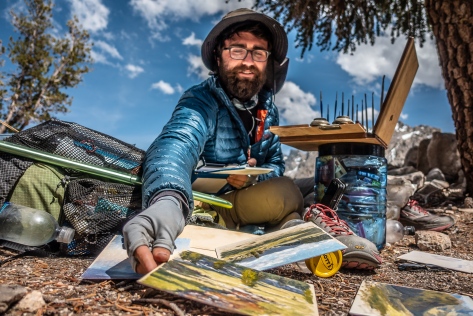
Unlike ‘Painter’, who carried 5 1/2 lbs of oils, brushes and canvases and a home-made easel on his thru-hike, a photographer’s tools are much simpler.  Sony RX100 V, 24mm equiv., f/1.8, 1/640 sec, ISO 125


Being able to bring back breathtaking images from a lightweight adventure trip, such as a thru-hike, are really part of the purpose of the trip for me.  But when the need to go ultra-lightweight conflict with the need to bring a camera, some decisions need to be made to keep the weight down, and the quality up.  Here’s the gear I used for my PCT thru-hike, my thoughts and process:
The Gear
For ultralight adventures, I have a preference for compact cameras with 1″ sensors, like those made by Canon, Panasonic and Sony.  I carried one of those to the summit of Everest, and are what I chose for my PCT thru-hike.  For me, they are the lightest weight, rugged enough, high quality option for a trip where minimum weight is a priority.

IMG_0992
The Approach to Mt. Whitney, handheld in low light.  Sony RX100 V, 24mm equiv., f/1.8, 1/60 sec, ISO 2500,

For my thru-hike, I used a Sony RX100 Mark IV and Mark V.  I damaged the monitor on my Mark IV in the desert, and my wife brought me a new Mark V to Kennedy Meadows, which I used (more carefully) til the end of the trip.  The Mark III, IV and V have similar focal length zoom rang: 24-70mm, so if you are trying to save some money, going down the evolution tree might suit you.  The 24-70mm zoom range is great for ‘people’ shots, but if I were to thru-hike the PCT again though, I would take the newest Sony RX100 Mark VI, which has a 24-200mm zoom range.  The additional telephoto range is useful for wildlife, but sacrifices a bit of aperture to do it, so it isn’t as good in low light, and will have a bit more image noise overall.  Also, it costs more than the other cameras.

IMG_1004
Cooling off in the Feather River.  Getting it all in with the Moment Superfish lens on my iPhone 7+

I also used my iPhone 7 plus with the Moment Superfish lens* to complement my Sony RX100 for a wider (fisheye) focal length perspective.  Why not use my iPhone for all my shots?  For me, the main deal breaker is that it doesn’t do so well in low light.  They are also cumbersome to operate, especially if you want manual settings.  My iPhone camera makes a good supplement to my compact camera for options, like a Fisheyeultra-wide or Macro lenses, but as a main camera, they are not quite there yet for me.
*Note: Use of Moment Lenses requires the Moment Case.

_DSC6008-2
Sony RX100 V on the Ultrapod, 10 second self-timer, 24mm, f/8 for depth of field and sunstar, 1/60 sec, ISO 125

I used a lightweight Pedco Ultrapod mini-tripod, which I left attached to the camera most of the time, mainly for selfies, like those you see in these shots and in the video below.  You have to be creative with setting it up: You can set it up on the ground, on a rock, strapped to your trekking pole, tree branch or post.  The whole setup fits in a ZPacks Shoulder Pouch attached to the shoulder strap of my backpack for quick access.  For selfies, I used the 10 second self-timer on the camera to allow me enough time to get into position, then fired off a burst of 3 or 5 shots.  There is also an option on the RX100 to use your smartphone as a remote, which I used once for a night shot.
For my iPhone, I had a Joby Griptight One, which I bought together with the Micro Stand.  That could be a great option if you just wanted to use your phone camera for the thru-hike.  I took the stand off and just used the Griptight part to attach my phone to the Ultrapod.  I have the ProCamera App on my iPhone, to shoot RAW and for the extended self-timer.   I also carried a bluetooth remote shutter release for the iphone which I used only once.
In The Field
I tend to do most of my photography in the early morning.  The light is great, I feel fresh,  and I have the whole day ahead of me with no pressure to reach a campsite for the night.
Processed With Darkroom
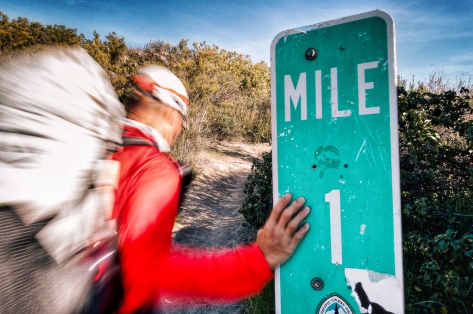
I wanted to create a shot of the One Mile marker with a blurred hiker walking past.  I tried out different shutter speeds, and this one worked out best. Sony RX100 IV, 24mm, 1/6 sec, f/11, ISO 200


I shoot mostly in Aperture Priority Mode.  I’ll choose something like f/1.8 for shallower depth of field or perhaps f/11 to create a sunstar if I’m shooting into the sun.  Occasionally,  I’ll shoot in Shutter Priority Mode to create some motion blur, as in the photo above.  Shooting in one of these semi-automatic modes frees me to make one creative decision, either the aperture or shutter speed, while letting the camera work out the the rest, like the ISO.  I will put the camera in Program Mode if my brain is fully occupied with other tasks or I need to focus, like when climbing Everest and low on oxygen.  I rarely shoot fully Manual, but will do it if it’s something the camera cannot handle, like night shots.
My Sony RX100 camera charges directly with a USB cable, so in the evening, it’s a simple matter to just plug in my camera into the power bank for charging.  I had a Suntactics S5 Solar Charger, and found it very useful in the desert and the Sierras, but not for NorCal, Oregon and Washington, where I replaced the solar charger with a Qualcomm quick charger for quick town stops.
Post-Process
When I have a zero (rest) day, I’ll transfer selected images from my camera to my phone for editing, posting to social media and for backup to the cloud.  I used to carry an Apple SD Card to Lightning Adapter, which would allow me to transfer the RAW images, but found that too much of a hassle, so I just used the built-in Sony App to wirelessly transfer a small JPG file from my camera to the phone.  These were good enough for Instagram, but not for viewing on a large monitor or for printing. However, If you shoot JPG, the camera will transfer a large JPG file to the phone.  I used Adobe Lightroom CC (paid) and Snapseed (free) on my phone to edit and post the images.  Not everyone likes my editing style, but if you are interested to replicate the look, here’s a quick and easy Snapseed editing tutorial on how I do it.   The images you see in the video linked below have all been reworked from the original RAW files for viewing on large monitors.


This seems a lot of effort, and it is, but I love sharing the experiences I’ve had with others, and having powerful images that make an impact are worth it me.

Sunday, July 31, 2016

How to Edit a Photo on Snapseed in 5 Easy Steps

Snapseed is a powerful, easy-to-use, photo editing app that's available on both IOS and Android.  Best of all, it's FREE!  Here are 5 easy steps that could benefit just about any photo, that you can easily accomplish in Snapseed in 5 minutes or less.


Below is the original image of me on a slackline captured on an iPhone 6 Plus by my wife, Laura.  It's a great shot!  Laura captured the moment perfectly, but the image could use a little help from Snapseed to really make it 'pop'!  Above is the final image after editing in Snapseed and uploading to Instagram.  Wow!  It only took me about 2-3 minutes, and in only 5 easy steps!  Here's how I did it:


Step 1: Straighten and Crop Tools
Straighten the image using the Rotate tool if required, and then crop.  For this image, I cropped in tighter, removing excess 'clutter', kept the sun in the image, and had the end of the slackline run out to the bottom right edge of the frame.


Step 2: HDR Scape Filter
This is a powerful tool to adjust exposure.  You could adjust the exposure with more control using a number of different controls, but with just one step, this filter will brighten the shadows and bring back some detail into washed out highlights.  You can also brighten or darken the overall image.  Of the 4 settings: Nature, People, Fine and Strong; I tend to use Nature unless there are people in the shot.  But I'll run through Nature and People to see which one works better.  Most photos can benefit from a little use of this filter, but be careful not to use overuse it, otherwise your image can come out looking too flat and fake.  In general, I don't exceed 50% with this or any setting.  I used +40% of the Nature setting here, with brightness set at +50%.


Step 3: Drama Filter
This is where the magic happens.  Like the previous filter, Drama accomplishes a lot in one step.  Drama adds local contrast, sharpness or 'pop' to an image.  There are a number of different filter settings at the bottom, and clicking each will give you a good idea of what it does, but the default setting is way too strong and the saturation too low, giving the image a 'gritty' feel.  You can adjust to suit your taste, but for me, less is usually more.  I generally use Drama 2, but dial the effect down somewhere between +10 - +50%, and then I raise the saturation up until it looks normal.  For this image, I set the filter strength at +25%, and the saturation at -15%.  Toggle the before/after selector on the top right to see how far you have taken the effect.


Step 4: Selective Tool
We are almost done.  Go over the image and have a closer look at the details.  Faces are one area that require special attention, and in most cases, could do with a tiny bit of brightening.  I used the Selective tool to make a little circle around my face, and then I brighten it just a little.  In this case, I used +10% brightness.


Step 5: Vignette Tool
In most cases, I add a vignette to isolate the subject.  Some images look better with it, some look better without it.  In this case, the bright areas to the right are distracting, and I used a vignette and moved it over the left center of the frame.  The default Outer Brightness of -50 was fine, but I raised the Inner Brightness to +10.  You could use some of the other filters, such as the Lens Blur to do it as well, but that look is a little harder to pull off.

The final image, as uploaded to Instagram, is on the top the page.  I use these same 5 steps in about 90% of the images I upload to the web.  Below is another before and after example I shot with my Sony RX100 of Laura at the National Mountain Bike Championship.  Check out my Instagram feed for more examples!


Friday, June 24, 2016

Shooting Bali Rides

Cool!  I was invited to Bali to ride and shoot a video for Nina FiztSimons and Ramang Kristian who own and operate Bali Rides.  I got to invite four of my friends down for this four-day gig, so I asked my wife, Laura, and long-time collaborator Aloysius Wee, President of the Kuala Lumpur Mountain Bike Hash Scott Roberts, and GoPro Distributor for Malaysia Khoo Boo Hian along for the ride.


As usual, the riding was superb.  We got to ride new singletrack, including a moderate downhill track, which was about the maximum I could handle with my XC bike.  The weather held up all four days, and the views were stunning!  If you get a chance to go to Bali, give these guys a call.

I took what I thought was a minimum of gear for the shoot, but I've learned that I can pare it down even further.  For my style of shooting, here's what I think I need:

Main Camera: 
Sony A7sii.  Full frame for shallow depth of field.  Shoots insane low light.  Useable video autofocus.

Lenses:
Zeiss 24-70mm f/4.  Relatively compact and lightweight.  A good general purpose lens.
Sony 10-18mm f/4.  Useable full-frame at about 16mm for ultrawide and timelapse shots.  Also restores wide to normal perspective at 100fps at which the a7sii crops in 2.2x.

GoPro:
Hero 4 Black.  For POV, drone shots, and anything that is going to get wet.
Essential mounts: Vented Helmet mount, Chesty, Jaws Clamp, tripod mount, Selfie stick.

Tripod:
I use a tiny Slik Sprint Mini with the center column removed and a Really Right Stuff compact ballhead bolted directly to the legs.

Drone:
DJI Phantom.  I'm still using the original Phantom with a cheap gimbal.  I've two minds about using a drone.  On the one hand, the drone is bulky, heavy and a pain to carry, set up and fly, but on the other hand, it gets shots like nothing else can.

Sound:
Rode VideoMicro on camera.  I used this for the interview with Scott and also for the temple shots, but I should really use it all the time instead of the built-in mic.  For really light weight adventures, I'm going to leave my wired lavalier mic and Zoom H1 recorder at home.

Slider:
Ratrig Mini 35.  Never used.  There just wasn't time to set it up.  All the sliding shots you see in the video are hand held and stabilized in post.  That proved to be good enough for me to leave the slider at home for light weight travel.

Thursday, March 3, 2016

The Newbie's Guide to Setting Up The Sony A7s Mkii for Video

So you've got yourself a Sony A7sii, and have yet to decide how best to set up the gammas, gamuts, autofocus modes, sound levels, etc.  If you're a newbie, you've probably come to the right place.  I have been experimenting on the best ways ways to set up the camera, to get the best results for an amateur filmmaker (like me), for adventure or travel.  This means that the camera has got to be quick, easy to use and produce good results.  There are a lot of options on this camera, and I'll cover what I think are the most important ones a newbie should know.

Base Frame Rate
I shoot NTSC 24p with a PAL A7sii.  This means I get an idiotic reminder everytime I start up my camera, slowing down an already slow start up.  I do this because I prefer the look of 60 and 120 fps slowed down to 24 fps in my editing program versus the look of 50 and 100 fps slowed down to 25 fps.


Customized Buttons
I configured the C1 button to start and stop movie recording.
C2 button is set to Clear Image Zoom.  This gives a better image than simply cropping in post.  It is not useable for RAW stills, and for the 120p video mode (which is already cropped in 2.2 times).

Configuring Movie Mode
Mine is set to XAVC S 4K, 24p 100M, Aperture Priority Auto, Auto ISO, Auto White Balance, Metering Mode Multi, Continuous AF, Wide.  This is my 4K mode.  I use this when I want the highest quality (gives me options to crop or stabilize in post), or for low light (24p will give me the lowest shutter speed).  I've selected Autofocus On by default, and set to Continuous Wide on all my video modes.  Video AF is usually useable, but slow on the A7sii.  If I want manual focus, it's a quick flick of the AF/MF switch to MF, and toggle the button (see 'Back Button Focus' in Setting Up the Sony A7sii for Adventure Photography to set this up).  I use Aperture Priority and let the camera select the shutter speed and ISO automatically.   I find that works well for me and allows me some creative control while not slowing me down.  I use the exposure compensation dial if multi metering mode isn't giving me what I want.  Auto White Balance on the camera has been working well for me.

Memory 2 on the Mode Dial is set to XAVC S HD, 60p 50M, with the other settings the same as above.  This is my 1080p 60fps mode.  I'll use it when something is moving or when I might want slow motion.  It's quite a good, general purpose frame rate, and I'd use it more often, except that in this mode, the camera goes into 'P' Program mode and I can't control the aperture.

Memory 1 is set to XAVC S HD, 120p 100M.  This is my extreme slow motion mode.  I sometimes use it if I need more reach as the camera crops in 2.2 times.  It's a huge crop.  It changes my 10-18mm E-Mount lens into a more useable 22-40mm.  The camera also goes into Program mode on this setting.

Gamma, Gamut and LUTS
Gamma refers to how the camera treats the difference between the dark and the light areas of the image, and Gamut refers to the range of colors available.  A LUT (Look Up Table) converts the gamma and gamut into a 'look', in this case, a 'film look'.  To a newbie, Sony offers a bewildering choice of Gammas and Gamuts.  I scoured the internet, keeping an eye out for looks that I liked, tried out the ones I liked, and decided on one which worked best for my workflow in my video editor, Final Cut Pro X.  I use Cine2 Gamma, S-Gamut3.Cine, with the Detail (Sharpening) at -7 in conjunction with FilmConvert LUTs.  Technically, you don't need to use a LUT, but I found a yellow/green cast in my footage that was difficult to correct.  Initially, I thought this was due to the use of Auto White Balance, unfortunately, that was the color that came out of this camera.  The good news is that LUTs, like the ones used by FilmConvert, are able to take color and gamma information and, quite easily, convert it into something pleasing.

Test Settings and Grading Sony A7sii from Kenneth Koh on Vimeo.

Sound 
I find the built-in mics to be be pretty good for capturing ambient sound, and use these settings in general.
Audio Recording Level 20
Wind Noise Reduction Off

These are the settings that I'm using now.  I hope this was useful to get you started in setting up your own Camera.

Monday, February 29, 2016

Free Online Filmmakers Seminar

The world's largest free online event for filmmakers is happening in less than 24 hours.  I signed on a week ago, which means I've been getting a weeks worth of spam email... Seriously though, I've only gotten about an email a day, 'encouraging' me to sign up for their paid program.

The program looks legit, so it's worth the hassle.  Check it out at CineSummit.com


If you remember Brandon Li, whom I interviewed a while back, he's one of the filmmaker's contributing to the seminar.

Saturday, February 20, 2016

Accessories for the Adventure Shooter's Sony A7s MkII

Here are some accessories that I use for my Sony a7sii, but could work for any alpha a7, a7r, a7s mk1 or mk2 adventure shooting kit.  Some, like the SDXC Memory Cards and a Screen Protector, are what I'd consider to be 'must haves', the others are nice to have.

64GB SDXC Memory Card
I know I read this somewhere before buying my camera, but in the excitement, I forgot all about it and as a result, could not shoot 4K video until I went back to the store to buy new SD cards. Take note that SDXC cards of at least 64GB size are required, the the memory cards from your last camera might not work.  I thought the Sony's were best 'bang for buck' and that I wouldn't have to worry about compatibility issues, and got 2 Sony Class 10 UHS-1/U3 SDXC up to 95MB/s Memory Card in 128GB size.

Extra Battery
For adventure or expedition shooting, you probably won't go through as many batteries as say, a wedding shooter.  The Camera does come with 2 batteries in the box, and although I've yet to go through more than 2 batteries in a day of shooting, it's worth picking up a 3rd battery as a spare.  I stopped using 3rd party batteries and only recommend using original Sony NP-FW50 batteries for consistent performance.  Sometimes, there's a deal from Sony to purchase an extra battery when you buy your camera.  Be aware that there are fake batteries circulating in the market.

Mindshift GP2
Mindshift GP2
I keep my memory cards and batteries in a MindShift GP2. It's made for Gopro accessories, but will hold 2 SDXC memory cards and 2 Sony NP-FW50 batteries.  I number my batteries and cards, and the clear holder allows me to see which card/battery is next up to cycle.  It's lightweight and allows me to secure way to store and organize those essentials.

LCD Screen Protector
Before you take the camera out of the box, put an LCD Screen Protector on it.  I had mine for just a day before I went back to the store to put a screen protector on, and the screen was already scuffed.

Peak Designs Leash Camera Strap
The Leash, by Peak Designs
Consider the Peak Design Leash Camera Strap.  I frequently take the strap off so it doesn't interfere with me moving the camera around and either snagging (hence ruining the shot) or making some kind of noise that will interfere with the built in camera microphone.  I'm used to homemade solutions, but the Leash is the best, lightest and most adjustable design I've seen, and will allow you attach their 'anchors' directly to the camera lugs, thereby eliminating the need for the triangular mounts, which could be a potential source of noise as well.  I also bought their Standard Plate, so I could attach the strap to the plate and have the camera over my shoulder hanging lens down, a much more ergonomic position.  Note that the strap is thin, and may not be the most comfortable for heavier setups.

Think Tank Body Bag

Camera Body Pouch/Bag
I like the Newswear Body Pouch that I've been using for years.  It fits the a7sii with 24-70mm lens, but with the hood stored in the reversed.  I've recently acquired the Think Tank Body Bag, which is larger and can store the same body lens combination (or a larger lens) with the hood in place, ready to use.  These bags are the ultimate in flexibility and lightweight for the adventure shooter.  I can use them as a chest pouch, mounted as a holster on a belt, or chucked into any backpack.  The velcro flap gives quick access to the camera, but dust protection is not so good.

Zeiss Lens Cleaning Wipes and a Chamois
Zeiss Cleaning Wipes
A friend gave me a box of Zeiss Lens Cleaning Wipes and since then, I've ditched my Lenspen in favor of them.  Nothing wrong with the Lenspens, its just that I never throw the old ones away, and I just don't know which have been around long enough to have picked up enough grit on the cleaning pad to be dangerous.  The Wipes are one-time-use, so I know they are clean.  I bring one wipe for every 3-4 days, plus one spare, or about 3 wipes for week long trip.  I also carry a  reusable chamois (synthetic, microfiber) to clean, and wipe off fog or moisture from the lens.

Sea to Summit Dry Bags.
They have nicer colors.
 
Ultralightweight Dry Bag
The Think Tank Body Bag (above) does come with a waterproof cover, but for extended periods in the wet, and also for unforseen circumstances, I prefer the security of a fully-waterproof dry bag.  I use a Sea to Summit Ultra-Sil Nano Dry Sack, which is lightweight and folds small out of the way.  The 13 liter size fits my camera with body bag, and a spare lens.  Or, a plastic bag stuffed into your camera bag will do in a pinch.

Tuesday, February 16, 2016

Burma Rising

Balloons over Bagan, Myanmar.  
Myanmar, also known as Burma, is a country of contradictions.  It's a land of jaw-dropping beauty and a people who have endured decades of oppression and hardship. Until recently, it was isolated from the rest of the world, and its unique culture has survived the 21st century relatively unscathed.  Burma is rapidly catching up with the 21st century, and not all of it good.  Certain technology, like cellphones, is cheap, and even poor farmers have smartphones and can be seen texting from atop water buffaloes.  Plastic bags litter the landscape, as basic needs like trash disposal, health care, and infrastructure (power, roads, etc) are either practically non-existant.  Buddhism plays a major role in the country, providing a system of basic education, health care and a moral code for the people.
A monk grabs a photo with his cellphone at the Temple of 582,000 Buddhas, Thanboday, Myanmar.
My wife, Laura and I were there for some biking and photography/filming.  Laura is recovering from a slipped disc and was not sure how much biking she could do, and so we opted to take a supported tour from a local operator.  This turned out to be a good thing, because her back was far from recovered.  We flew into Mandalay, and visited Bagan and Inle Lake.  We also visited Yangon from an earlier trip, and clips from that trip are also included in our trip video below.
End of the day, Bagan, Myanmar
We didn't have much information on biking when we planned our trip, and we didn't know how much biking Laura could do, so we wrote to a couple of companies and asked if they could take us to the places we wanted to see, and to do some biking as well.  All the biking was planned on road, usually tarmac, but occasionally some dirt road.  The paved roads were extremely busy.
Fisherman, Inle Lake, Myanmar
Our guide was extremely accommodating, and although not a mountain biker, took it upon himself to find more dirt roads to escape the traffic.  I experienced the graciousness of the Burmese people, saw the beauty of the land, and came away with a feeling of hope for the country.


Burma Rising from Kenneth Koh on Vimeo.

Best time to visit is in the Burmese winter.  It's cool and dry in the mornings and evenings, and the quality of light for photography is amazing.  We find prices to be on the high side for South East Asia.  Hotels and transport are expensive, probably to some sort of government tax, and food and labor are relatively cheap.  Exchange your currency (new, large note US dollars are preferred!) in Burma, and buy a SIM card for your phone at the airport.

Monday, December 21, 2015

Top 12 Bikepacking Videos of 2015


I'm stoked to have my video make Bikepacking Magazine's 12 Best Bikepacking Videos for 2015.  I'm honoured, and also humbled, to share this accolade with so many well crafted short films.  It's really motivating for me to further my craft.  I can't wait to make the next one!

Saturday, November 7, 2015

Testing The Sony A7S MkII For Adventure Filmmaking

In a previous blog post, I wrote about how the Sony A7S II might be the ultimate adventure filmmaker's camera and about how it might be a replacement for my Panasonic GH4.  I went ahead and bought an A7sii from Sony, and a used Zeiss 24-70mm f/4 lens, and that's what I used for the video below.

I took it to the climbing wall, and used it the way I would be using it outdoors, to see if I liked the way it handled. I climbed with it, anchored myself to a bolt and shot the climber below me.  I liked how I could turn the camera on with one hand (very Nikonesque), and the grip, although short, was sufficient.  The setup, with the Zeiss 24-70, although not light, was well balanced, and the 5-Axis Stabilization worked very well.  All in all, it worked out well for me. Check out the test video below:


Adventure Testing Sony A7SII: A Day At The Climbing Gym from Kenneth Koh on Vimeo.
Password to view: 'nomad'

I shot this video as a quick test to see if the Sony A7s Mkii would work for me as an adventure filmmaking camera.  Meaning if I could get used to the handling of the camera, and if if I could get it to work with the way I shoot, and get the results I wanted.  I wanted some creative control, but not be overburdened, and so I chose to control only the aperture, and left White Balance, Shutter Speed, ISO and (mostly) Autofocus in Auto.   Everything was recorded at 4k resolution, 24fps, and the aperture was left wide open at f/4.  I used the Autumn Leaves Creative Style in camera with the saturation and sharpening turned all the way down, the Dynamic Range Optimizer set to 4, and white balance set to Auto.  The light in the gym was a mix of sunlight filtered through the skylight, and florescent light. All shots were hand-held (except for the title clip where I used a slider), with a little stabilisation (Coremelt Lock and Load) applied in post on about half the clips.  Editing was done on FCPX, with some color balancing, contrast, grain and a vignette added in some shots.  Voice over was recorded on location, using a Audio Technica ATR3350 lavalier mic plugged directly into the camera.  The whole thing was shot in about 2 hours, and the edit took about a day.

Here's what I liked about the A7sii:
  • What I found most useful was the 5-axis stabilisation on the camera.  I had that on the Olympus OMD EM5, and missed that feature sorely when I sold the camera to buy the GH4.  
  • Video Autofocus - It can be a bit slow for faster moving subjects, but it's surprisingly useable. 
  • ISO freedom.  It was a bit dark in the subway station, but ISO wasn't even a concern. 
  • Internal 4k, but I already had that with my GH4.
Here's what I didn't like:
  • Ergonomics and the Menu System could be better... but then you already knew that ;)
  • Mine's a PAL model, and I need to set it to NTSC to shoot 24p and 120p.  Every time I turn on the camera, I get a warning that the camera is in NTSC mode.  There is no way to disable or turn off this warning.  Seriously?  Every time?  Don't you think once would be enough?
  • No way to set up a custom button to shoot in APSC Crop Mode.  I've set up one of the Memory Recall settings on the Mode Dial to shoot 120fps, which also puts me in APSC Crop mode, but that activates Program Mode and I have no control over aperture or shutter speed.
I've only had the camera for a week, so I've got a lot more learning to do.  I want to play around with some of the other color profiles, and I need to buy and test out the Time Lapse App.  One other big unknown for me is how the small Sony batteries perform in extreme cold.  

Will I be replacing the GH4 with the A7sii?  I think so, although it was closer than I thought.  I really liked the 5-Axis Stabilization, which comes in very useful for a one-man, run and gun type shooting.  Video Autofocus has difficulty with subjects moving too quickly to and away from the camera, but is otherwise very useful.  The image quality is very nice, both at 4k and in the APSC Crop at 120fps, with an organic feel and nice subject separation.  My main issue is with the weight.  In order to keep the weight reasonable, I've chosen to replace my M4/3 standard 3 lens setup with focal lengths that range from a full-frame equivalent 14-280mm for a single 24-70mm f/4 zoom.  In doing so, I'll lose a lot of focal length range, but that's the tradeoff for the features on the Sony I think are worth having. 

Wednesday, November 4, 2015

A World to Share: Q&A with Brandon Li

Brandon Li is a former MTV Reality Series Producer/editor where he learned documentary style filmmaking.  In 2013, he sold everything he had, and is now literally living his life out of a suitcase, editing projects on a MacBook Pro with the hard drives velcroed to the back, travelling and making award winning short films about the cultures and people he visits.
Brandon Li.  Image courtesy of Brandon Li
I'm stoked to have had the opportunity to interview Brandon about his life and the art of travel filmmaking.  His short films buzz with energy and have won numerous awards.  Check out what Brandon has to say and see some of his work in the blog post below.


Gateway to the Ganges from Brandon Li on Vimeo.

On the Nomadic Lifestyle, Travel and Inspiration
“I draw most of my artistic inspiration from that feeling of being in a new place.   When everything is new to me, it's easy to feel inspired to shoot.  It's constantly exciting and interesting, but at the same time I frequently feel uprooted or disoriented by the constant moving.  I've had a lot of days where I would wake up wondering what country I was in.” 

“I really don't have much other than my camera gear and about 5 days of clothes.  If it doesn't fit in a suitcase and a backpack, I can't own it.  Language barriers are a constant issue.  I get lost a lot.  I frequently have little doubts, like when I'm lost wandering the streets of a new country with all my bags… and it starts raining!”

“It is difficult to stay grounded, but what makes it worthwhile is getting to immerse myself in other cultures instead of just passing through like a tourist.”


Tokyo Roar from Brandon Li on Vimeo.

The Method, Process and Technique
“I consider the commercial work and the personal work to be practice fields for each other.  I learn things doing my commercial projects that I want to apply on independent films, and then I figure out techniques on those films that I can bring back to the paid gigs.  I always want to push my abilities a bit further with each film.”
“For my personal projects, I improvise based on the people and landscapes I encounter while wandering around.  I look for things that can't be planned; this is what I feel gives a film energy.  For instance, filming a mountain at sunrise is much more interesting to me if there are children playing a pickup game of football in the foreground.”

“My reality TV experience taught me how to spontaneously shoot scenes that feel complete. Basically I shoot "coverage" - wide, medium, close.  I try to encourage people to ignore the camera, another skill from reality TV.  It's a game of getting close without being intrusive, and it just takes practice (and lots of mistakes).”

“In editing, I put together this coverage like one would do with a scripted film, re-arranging shots to make the scene flow naturally. Once I have a few key scenes edited, I'll figure out the bigger storyline of the whole video.  That's the main challenge.  The most difficult part of editing is getting the pacing right so that the film seems to follow a natural trajectory and ends satisfyingly.  This just takes many, many revisions.”

“I consider shooting to be kind of a sport, so I make sure I get out there and shoot as often as possible and improvise new techniques.  I think techniques are as important as gear.  Most of my camera moves are done just by moving my body in the right way, and most of my edits are simple cuts with no fancy effects or plugins. If you're not getting the shots you want, try changing your technique before acquiring more gear.”

Brandon shooting in Guam (Chamorrofilm.com).  Photo by Jessica Peterson
Tools of the Trade
“I like shooting with any camera that can deliver the image and still fit in a backpack.  That's my main requirement - I have to be able to travel easily with it.”

“GH2 was great for a while, but then the A7s came along with a myriad of superior features, such as low light performance, zebra stripes, peaking, slow motion, etc.  Plus, the A7s is actually a pretty tiny camera provided you aren't using the larger, heavier lenses for the system.  It's lighter than the Gh2 body.”

“I've just recently bought a Sony A7rii, which I used on my last personal project along with the Sony RX10ii and a few GoPros.  I like shooting 4k, even if I will be outputting a 1080p final film, because it allows me to crop and re-frame my shots in post.”

"If I had to choose 3 lenses to travel with, they would be the Sony 24-240mm, Nikon AIS 50mm f/1.4, Sony 10-18mm.  First requirement is covering the "normal" focal lengths.  As a travel filmmaker, I rely on my zoom lens quite a bit to frame distant subjects.  It's not a fast lens (f/3.5-6.3) but the Sony cameras have good low light performance so I can still use it for most circumstances.  Second requirement is having shallow depth-of-field ability, which the 50mm takes care of.  That Nikon lens focuses quite close, so I can use it for macro-type shots as well as normal portrait stuff. Also, because it's adapted, I can remove it from the adapter to do lens whacking (special defocus effects).  If I had to lose one perspective it would be the ultra-wide one.  I can almost always re-frame my shot, or just step back, to get that wide perspective."

Where to Next and Chilling Out
“I usually pick my locations to be near my potential future projects.  It's kind of a tricky game planning where to be - I don't want to fly off to a remote corner of the globe and then book a shoot in London, for instance.  I just use my best intuition.”

“I've been to Tokyo twice this year because it's just awesome.  I love re-visiting places and catching up with friends.”

“When I chill out, I'm the laziest person on earth.  Earlier this year I rented a beach shack in Goa, India and spent a week just watching the sun set every day.”  "Maybe I should learn to play racquetball or something?”

Brandon's portfolio site unscripted.com showcases his personal and commercial works, and his tech blog RunGunShoot.com describes shooting techniques using minimal equipment.

Monday, September 21, 2015

Sony A7s II: Is This The Ultimate Adventure Filmmaker's Camera?

A travel and adventure camera should be lightweight, rugged, and simple to use while offering good image quality.  Last week, Sony announced the Mark II version of it's legendary low light camera, the A7s II.  Here are my thoughts as to why I'm considering this as a replacement for my Panasonic GH4 in 2016, and maybe why you should be considering this camera too.
Sony A7s II
When I got my Panasonic GH4 in 2014, I considered 3 cameras, each with its own special 'party trick':  The first generation Sony A7s with it's legendary low light sensor; the Olympus OM-D E-M1 with 5-Axis Image Stabilization, and the Panasonic GH4 with internal 4k recording.  The Sony A7s Mark II combines all these 'party tricks' into one camera.
  • 5-Axis Image Stabilization
  • Low Light Sensor
  • Internal 4k Recording
For a fast and light, run and gun, adventure/travel type photographer/filmmaker, these features are killer.

5-Axis Image Stabilization
I would put this feature at the top of the list.  It's the only feature I miss, moving from my Olympus OMD EM5 to the Panasonic GH4.  While it's useful for still photographers, it's simply incredible for videographers.  It's almost like having a gimbal/steadicam built into the camera.  Technologically, it's quite a feat that Sony has been able to stabilize a sensor 4 times the size of the M4/3 sensor like the OMD EM1.


With a little stabilization with software in post-production, this would look very solid

Low Light Sensor
Low light shooting on the A7s is a different league and opens up new shooting possibilities (I'm thinking pre-dawn alpine starts).  The A7s sensor also has more dynamic range than the GH4, and the new A7sII should be the same or even better.  Higher dynamic range will allow more flexibility in post processing, both for still images in for video.  The A7sII has a full frame sensor, which will give me more options with depth of field.

Check out the low light capability of the A7sii in this video from Sony

Internal 4k Recording
While the original A7s had the ability to shoot in 4k, it could not record this internally.  The new A7sII adds internal recording capability, which keeps the 4k setup compact, lightweight and simple.  This was the one killer feature the GH4 had over the original A7s.

Other A7sII Benefits over the GH4
USB Charging
One advantage the A7sII has over my GH4 is that the batteries can be recharged in camera by USB from an external battery, saving the need to carry a charger and cable.  It also makes it easier to possible to recharge in the field using a simple external battery like the Anker that I usually carry to recharge my iPhone and Gopro.  The A7sII battery doesn't last as long as the GH4, but they are also about half the size and weight, so I think that's a wash.

'Always On' Depth of Field Preview
One of the least used buttons on cameras is the Depth-Of-Field Preview button.  Cameras normally keep the lens apertures stopped wide open to allow the maximum amount of light in for a bright viewfinder and make it easier to manual focus.  When you press the Depth of Field Preview button, the lens is stopped down to the selected aperture, the image gets darker, and shows you what is acceptably sharp or blurred.  The A7s II can be selected to have the Depth of Field Preview 'always on', which means as you change the aperture, you can view the resulting depth of field changes 'live' on the LCD or EVF.  

Ability to Transfer RAW Images Wirelessly to iPhone
I shoot RAW still images.  It's nice to be able to grab a RAW shot off your camera, then send it wirelessly to your smartphone where you can do some basic editing, then upload it to social media.  The A7sII can do this with RAW files by converting them on the fly to JPEG images, which it then sends to your IOS or Android device.  If I wanted to do this on my GH4, I would need to shoot 2 copies on the camera, use the JPEG files to transfer to my iPhone, then come back home and delete all the JPEG files that I didn't need in the first place. 

Useable Continuous Autofocus in Video Mode?
Technically, the GH4 can rack focus by touching the screen.  Practically, I have not been very successful with this and tend to use manual focus.  Continuous AF in the A7sII video mode looks very useable in the following video clip.


No details on how the AF works for video, but this looks very useable

Downsides
A7s II, which has a Full Frame sensor, comes with some downsides when compared to a Micro Four Thirds camera like the GH4.
  • Weight
  • Cost
Weight
The A7s body and lenses, while lighter than comparable full frame equivalents from Nikon and Canon, are significantly heavier than the Panasonic GH4 kit that I'm presently using. The A7sII body weighs 584g. 480g for the GH4.  To replace the Panasonic 7-14mm f/4 Lens(300g) I'm currently using, I'll need the Sony 16-35mm F/4 Lens (518g).  Some increase in weight is to be expected, stepping up from M4/3 to Full Frame.  Sitting here at my desk, it's hard to imagine what an increase in load will feel like on my shoulders and back 3 days into a multi-day adventure, but I can tell you I won't like it.  As a side note, the A7sII battery doesn't last as long as the GH4, but they are also about half the size and weight, so I think that's a wash, weight wise.

Cost  
You get what you pay for.  If you are coming from a Full Frame camera, the A7s II may be reasonable, or even cheap.  Coming from a Micro Four Thirds camera, I find the camera and lenses expensive.  Again, you get what you pay for, as it's a step up from M4/3 to Full Frame, just something you should factor into your considerations.


Final Thoughts
The Panasonic GH4 is the best handling camera I've ever used.  It is a great balance between image quality for its size and weight.  I've used it in wet/humid, dry/dusty conditions, and it has not failed me yet.  But it's not particularly great in low light, nor does it have 5-Axis Image Stabilisation.  Ultimately, my decision to switch will rest on what Panasonic comes out with the GH5.

Tuesday, December 30, 2014

I'm On Instagram!

I'm happy to revive my Instagram account - Not happy about how I came to have so much time on my hands (laid up with a broken collarbone), but Instagram has given me a chance to take a fresh look at many of my old images. They have rekindled forgotten memories, and I have to admit, fitting my images into the square format is a nice challenge.  Here are some images from my Everest expedition that are already on my Instagram account.  Follow me on Instagram (link on the right) for more!